Monday, January 21, 2008

Two generations of PowerShot camers: the SD110 and the SD850IS

I recently purchased a Canon SD85oIS. It's almost exactly the same size as my much older SD110 (purchased in March of 2005). The SD110 was the second Powershot in the SD line, but it wasn't that new a design - Several of the S series of cameras had almost identical form factors, except for using a Compact Flash card instead of an SD card.

Side by side with the SD850IS you can see they share some common linage, but a lot has changed.

The 850 is much more curved. In theory this should make it rest more comfortably in your pocket, and indeed I feel this is true, though it's subtle. A really big change is the size of the LCD, which covers almost the entire backside of the 850. It's a very nice screen to frame and review photos, but it does mean that the camera doesn't have a good surface to hold onto any more. The SD110 had lots of open space for you to rest your thumb and other fingers, making it easy to hold securely. I'm still working on finding an effortless-but-secure grip on the SD850. I fear I may never find it.

The mode dial is recessed on the SD850, which again probably makes it easier on your pocket. But the SD110's mode dial was easier to flick into position. The zoom level on the SD110 was also a bit bigger than on the SD850. In this one case, it seems that the reduction in protrusions has no downside - both the SD850 and the SD110 are equally easy to zoom.

Interestingly, the UI for the camera is almost unchanged from the SD110 to the SD850. There are a few new options, and most notably, it's much easier to change the ISO setting, but on the whole the same menu structures and button names are used accross the whole SD line. I think this reflects the high quality of the SD110's menus - Canon figured out a good system way back then (or likely, earlier) and has stuck to it.

Sunday, January 13, 2008

Death of a CCD: RIP SD110


About a month ago I turned on my Canon SD110 and could see that something was very wrong. This took me by surprise, as I hadn't dropped it, or even taken it anywhere since the last time I took pictures with it, in my living room. I guess it just died of old age after 3 years (and 7000 pictures). The interesting part is that it was clearly the CCD that was failing. In some ways it actually looked pretty neat.

One way you can tell it's the CCD is the streaks in the images. The way data is read from a CCD is by copying off all the pixels along one edge of the CCD, and then shifting all the pixels in the image one pixel toward that edge. The line read off "falls off" the edge, and now the next line of the image can be read in. Part of the trick with CCDs is reading off each line in this way, without causing artifacts by the repeated pixel shifting. Clearly, something is going wrong with that process in my camera.

Click on the pictures to get full sized images.

Thursday, January 3, 2008

Windows 2k support for Canon SD850IS Powershot

With my new SD850IS camera I had a bit of difficulty getting my Windows 2000 computer to recognize the camera. It does work however - the problem was that the installation routine was unclear. One of the options was to install TWAIN drivers for the camera. TWAIN is a protocol most known for allowing programs, such as PhotoShop, to acquire images from a scanner. By default I assumed that Canon was giving you the option of doing the same, except that the source would be the camera. But since I have no desire to directly download images into PhotoShop I skipped installing it. Well, as it turns out you need the TWAIN drivers to download pictures from the camera at all, even if you are using ImageBrowserEX.

Come on Canon! It would be so easy to make this clearer in the installation program. Why should I have to read the manual just to install the right driver?

As it turns out, the new image downloading software that came with ImageBrowserEx 5.8 has a nice feature that the older versions did not have. First, you get a preview of your photos as they are downloaded from the camera. Second, you can tell the program to delete photos from your camera after downloading, automatically. This is a great idea - after downloading pictures there's no reason to leave them on the camera. With this change, it's finally the case that Canon's photo download routine is as useable as the default USB mass storage method of accessing your photos that most other cameras use. This is especialy true if you like the feature that Canon offers of splitting your photos into sepeate folders, one for each day you took pictures.

I still wish they also offered USB mass storage support, however, so that I could grab my photos off the camera without having to install drivers on machines that don't support the DPIC protocal that Canon uses (altho to be fair WinXP and OSX both support DPIC, so this is a dimishing problem).

Thursday, December 27, 2007

Canon SD850 battery life

The SD850 has pretty good battery life - I took 327 shots on my first fully charged battery. The LCD was turned off for maybe a 3rd of those pictures, and the flash was almost never used, but I did review my pictures after taking them quite a bit.

Unfortunately, the camera doesn't have a battery charge meter, so the end of battery comes with little warning. Once the low-battery warning came on I got about 20 pictures before the camera turned off. It takes about 2 hours to charge the battery, which is done by taking the battery out and putting it into a relatively compact (slightly smaller than the camera) wall charger.

view your photos at full resolution

If you have a >2 megapixel camera, it's likely that you never view your photos at full resolution, since even a 2mp image is larger than what most monitors can show. While full resolution may be out of reach, it's still possible that you can see more pixels than you do currently. If you have a CRT, it's very likely that you don't push it to the very highest resolution, as Windows just isn't usable (fonts are too small, as are toolbars, etc). And even some LCD users run in less than full resolution mode, for the same reason.

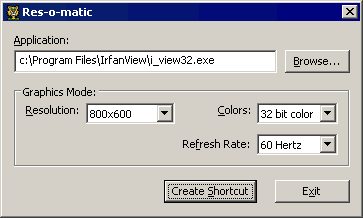
What you'd like to do is temporarily switch to a higher resolution mode while viewing your photos. You can do this by changing your desktop settings, but it's a pain to switch back and forth all the time. Luckily, there's an app that will do the work for you. Reso will change the screen resolution (and/or refresh rate) and then launch an application of your choosing. Once you quit that application it will return your screen to normal.

Use it to start Infranview and you have a high resolution image viewer. You can even place a shortcut on your desktop that does this, and then you can just drag any photo onto it to view the image in full resolution. You'll be amazed how much more your photo's "pop" when viewed at 1600x1200 or higher. This is one of the reasons to hang on to a good 19 or 21in CRT.

See also: this writeup.

Wednesday, December 19, 2007

further comparisons between canon sd850is and sony w80

Nightshots: both Ok, but sd850 is better.

http://www.dcresource.com/reviews/sony/dsc_w80-review/nightshot.jpg
http://www.dcresource.com/reviews/canon/powershot_sd850-review/nightshot.jpg

Lens:

(lab shot) S850 has more corner blur. W80 has more barrel distortion. Both are OK.
(real world) both suffer corner blur, but in different corners. SD850 is only slightly worse.
http://www.dcresource.com/reviews/sony/dsc_w80-review/DSC00016.JPG
http://www.dcresource.com/reviews/canon/powershot_sd850-review/IMG_0014.JPG

High ISO mode:
(iso 400): w80 is blurrier, but not so that you'd notice at 1280x1024. At 100% zoom it's definitely noticeable, and at 50% zoom it also is, but not badly. Conclusion: it's a toss-up if you don't use the full camera resolution.

Real world resolution:

not much difference in full light, esp. if you don't use full resolution.
http://www.dcresource.com/reviews/sony/dsc_w80-review/DSC00018.JPG
http://www.dcresource.com/reviews/canon/powershot_sd850-review/IMG_0019.JPG

in moderate light, there still doesn't seem to be much difference.

Non-photographic issues:

CIPA: W80 340 shots, SD850 230 shots
Dimensions: W80 3.6 x 2.3 x 0.9 in., SD850 3.6 x 2.2 x 1.0 in. (W80 slightly smaller)
Rotation sensor: Yes, both have it.

Friday, December 14, 2007

SD850is price drops

Amazon is still dropping the price on the SD850is ($250), though the price fluctuates up and down a bit. They remain the cheapest price on the net from a reputable seller. Meanwhile the Sony W80 is going for $180.